
SCC Team Project
Tool Used

Period
06/04/2024 - 9/20/2024
Target Audience
ASN Buyer

Study
Define Product
Study Current UI & UX

Analysis
User Feedback
Persona

Pre-Design
Goal
Strategy
TimeLine

Output
Design Iterations
User Testing
Documentation
ASN stands for Advanced Shipping Notice. ASNs are used by suppliers, retailers, distributors, and manufacturers, and are required in wholesale shipping. They help buyers and suppliers communicate across the supply chain, and can also help end consumers.
The process: PO (Purchase Order) → OC (Order Confirmation) → ASN (Advanced Shipping Notice) → GRN (Good Receipt Notice) → INV (Invoice).
Users are frustrated by the overwhelming presence of IT technical data over essential business information.
The layout wastes screen space, making it hard to maximize information density.
The lack of customization options for the ASN table view leads to inefficiencies with default column settings.
The ITEM detail screen is cluttered with unnecessary input fields, detracting from display-only information.
Users struggle with navigation due to the absence of tabs for ASN sections and pop-ups for additional actions.
The change history view lacks focus, showing irrelevant data instead of significant changes.
Line items are not compacted into a single-line table format, making it harder to digest information quickly.
The main action components are buried and not easily accessible on the first screen of the ASN detail page.
The number of visible ASN lines per page is too low, hindering an efficient overview.

Role: Logistics Manager
Experience: 8+ years in a mid-sized e-commerce company
Goal: Improve shipping accuracy, reduce processing time, and ensure all shipments are tracked in real time
I want to see the shipments generated by my supplier to validate that my orders are being fulfilled as expected (shipped materials by the agreed ship by/delivery date) so my production line isn't impacted.
Daily Tasks:
Track and Validate Orders: Confirm accuracy in order details and shipping notices.
Communicate with Suppliers: Resolve issues and get shipment updates.
Coordinate Inventory: Monitor stock and prepare for incoming shipments.
Create a user-friendly, accessible, and efficient ASN that meets buyers' needs, integrates seamlessly with their systems, and complies with industry standards.

Operational Efficiency

User Satisfaction

Error Reduction

Better Tracking

Stronger Relationships
Highlight key business information prominently ✅
Optimize layout to display more content without excessive scrolling ✅
Allow users to personalize column order and display preferences ✅
Save customized settings for future use as default ✅
Organize ASN details into easily navigable tabs (e.g., Header, Items, Attachments) ✅
Streamline change history to display only relevant data modifications ❌
Exclude technical information to enhance clarity for users ✅
Ensure that primary actions and components are easily accessible without excessive scrolling ✅
Prioritize the most frequently used functionalities for immediate access ✅
Reduce the need for page switching and enhance overall user efficiency ✅
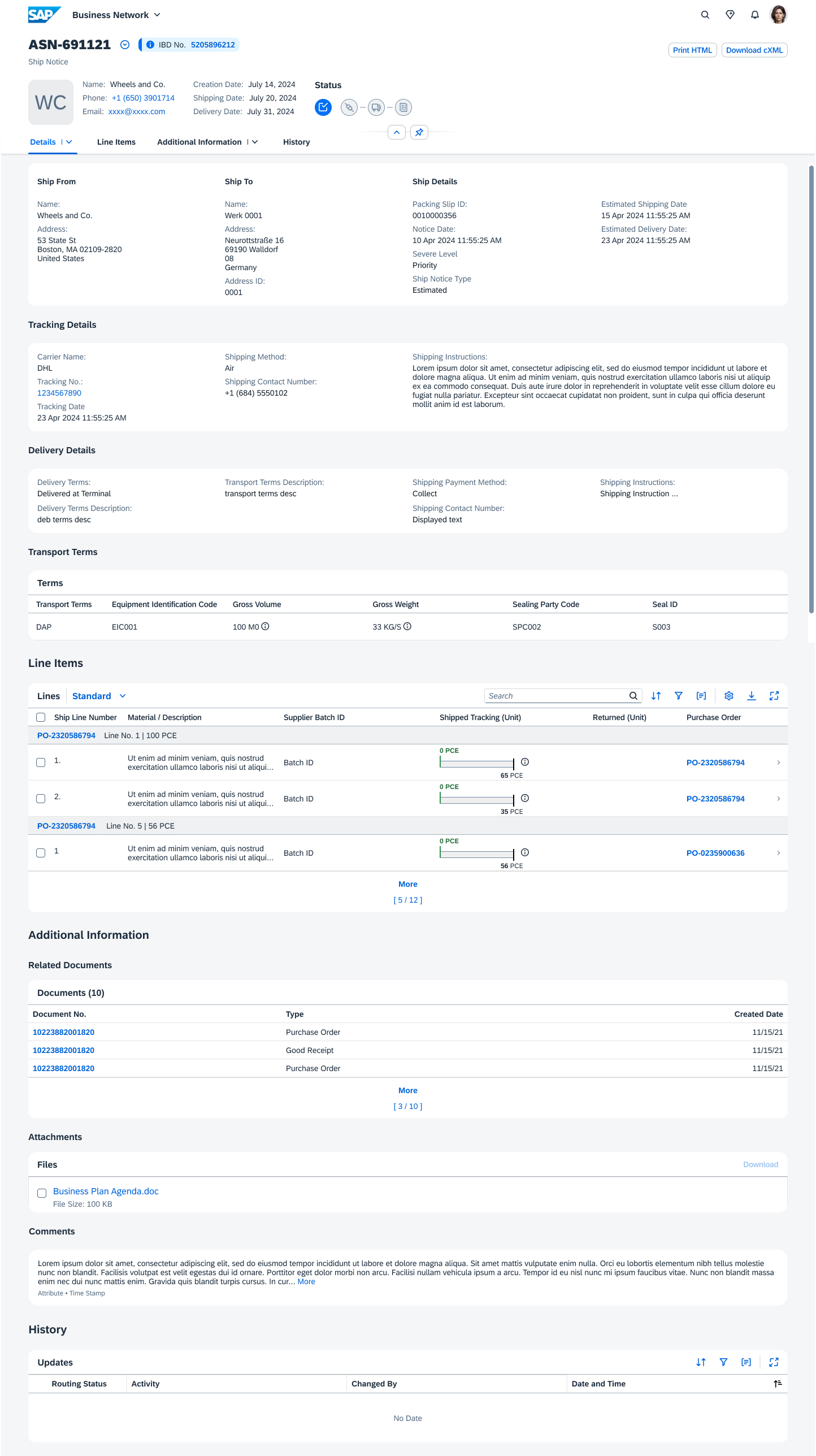
Highlighted Header & Anchor Tab Body
New updates helps buyers to quickly scan those multiple Status.
Saved Variants, Setting, Sorting, Filter, and Grouping allow buyers to pick the columns with flexible orders.
Improved Status Recognition: Color-coded status columns enhance decision-making speed and reduce errors.
Visual Indicators: Line-level attachment icons lessen the cognitive load when managing high-volume documents.
Flexible Cross-Page Navigation: Expanded multi-panel views and ASN drop-down lists minimize the number of clicks needed for document processing and highlight urgent exceptions.
Customizable Tables: Adaptable filters, search functions, and view settings enable users to personalize the interface, benefiting support teams handling large data volumes.
Onboarding tutorial for educating the differences between the new system and legacy experience. (For all NextGen products)
A smart system for providing information based on the user role. (Product Plans & Technical Support)
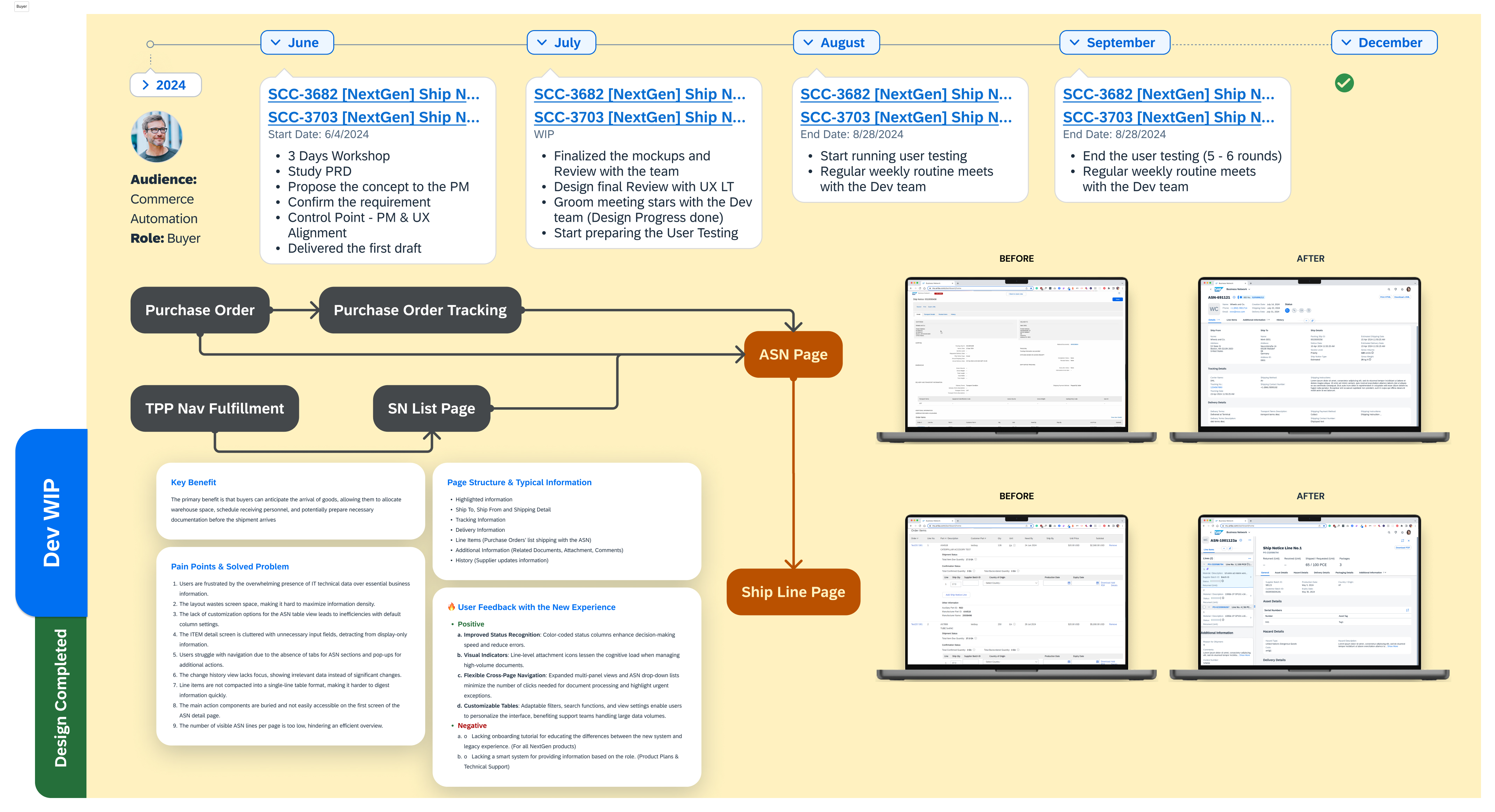
Click image to See the Detail - Click for Document Veresion
As the Senior Product UX Design Lead on the ASN project, I led our team in creating a 0-to-1 product to elevate the buyer experience. We started with in-depth research to uncover user pain points and prioritized high-impact features, refining every detail through a collaborative, user-centered design process. After thorough reviews, we delivered a polished version to the Dev team, ready for launch.
Then, midway through, our PM requested a significant scope change: to enhance the advanced buyer packaging details section. Given how close we were to launch, I initially pushed back, explaining the risks late changes posed to UX consistency and timelines. But after a deeper discussion about the strategic value, I analyzed potential success metrics and pivoted our approach.
To stay on track for the year-end deadline, I quickly reorganized our team, assigning three designers to focus exclusively on the new requirements. This agile reallocation allowed us to expand scope without compromising quality. Despite the challenges, we delivered an enhanced product on time, seamlessly integrating the new features to meet both user needs and business goals. This experience reinforced the impact of flexibility, strategic thinking, and teamwork in dynamic product design.
Keep prioritizing user feedback—it’s key for refining designs.
Maintain clear communication and alignment across teams; it makes everything run smoother.
Spot potential blockers early to save time and prevent delays.